
Accounts Payable Transactions Explained: Simple Accounting for Non-Accountants
Accounts payable is simply money that you owe. Rent, software subscriptions, contractors, supplier invoices—all of these create accounts payable transactions. Let's figure out what documents are needed for this and what to do in general.


Accounts payable sounds like something that belongs in a corporate finance department — not in the daily life of a freelancer or small business owner. But in reality, accounts payable is simply about the money you owe. Rent, software subscriptions, contractors, invoices from suppliers — all of these create accounts payable transactions.
Let’s break it down together — what accounts payable actually is, why it matters, and what you can realistically do with it without turning your workday into an accounting exercise.
What is an accounts payable transaction, in plain language?
An accounts payable transaction happens when you receive a bill or invoice but haven’t paid it yet. The moment that invoice arrives, you owe money — even if the payment is scheduled for later.
For example, you receive an invoice today for cloud hosting services, payable within 30 days. Until it’s paid, that amount sits in your accounts payable.
Why accounts payable matters more than you think
Ignoring accounts payable is one of the easiest ways to create financial stress. When bills are scattered across emails, PDFs, and messages, it’s easy to miss a due date or underestimate upcoming expenses. That's why it's important to collect and store all accounts payable data in one place.
Keeping track of accounts payable helps you:
- understand how much money is already committed
- avoid late fees and strained relationships
- plan cash flow with more confidence
Even for very small businesses, this visibility can be the difference between feeling in control and constantly reacting.
Where things usually go wrong
Problems rarely come from complexity. They come from inconsistency. Bills arrive in different formats, deadlines vary, and payments get postponed “until later.” Over time, this creates mental clutter and uncertainty.
This is often the moment when people start looking for ap automation software — not because they want advanced features, but because they want fewer things to remember.
How to handle accounts payable in practice (step by step)
The next question is obvious: what do you actually do with this information? The good news is that the process can be very simple — as long as it’s consistent.
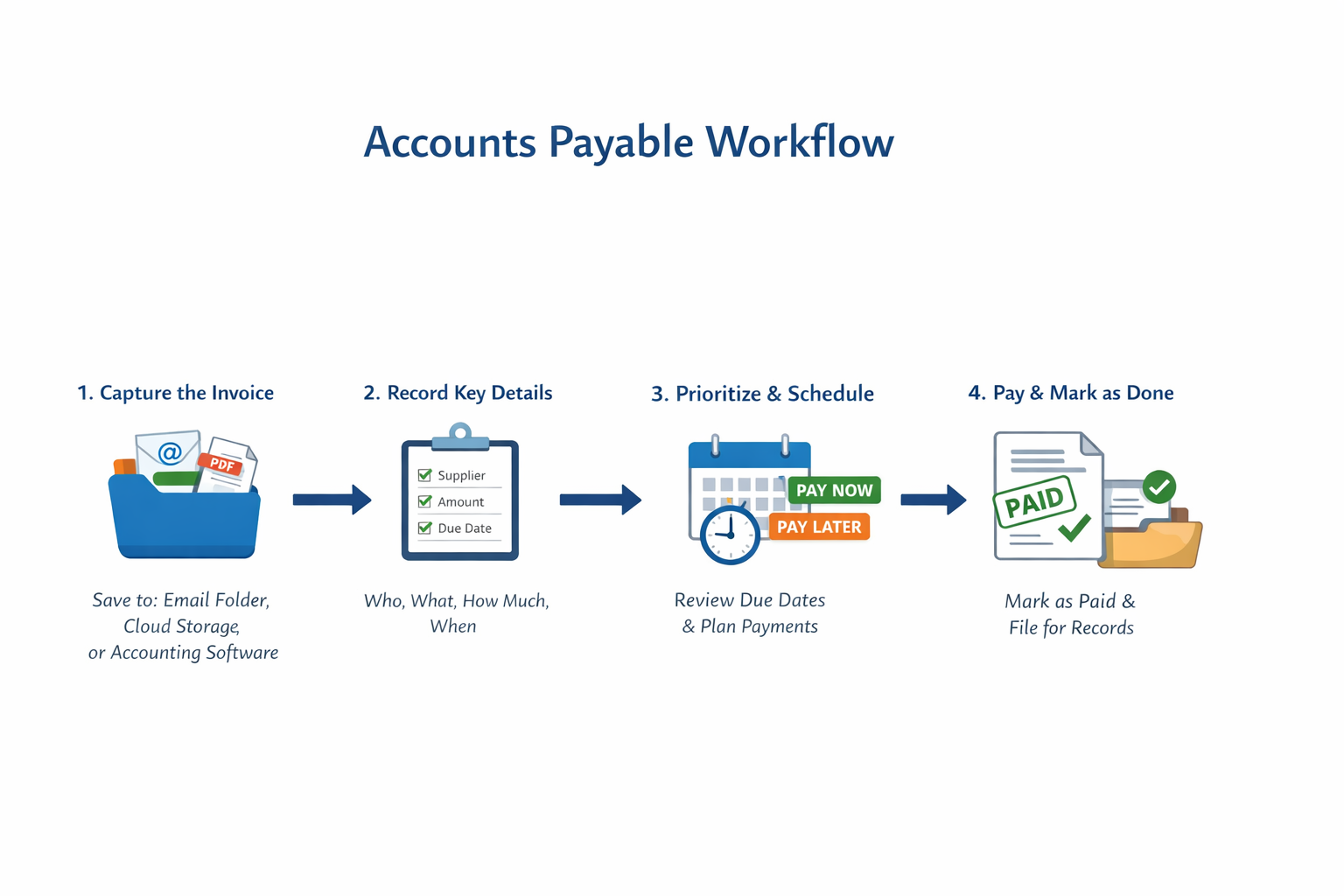
- It usually starts the moment a new bill or invoice arrives. Whether it comes by email, PDF, or online portal, the first step is to save it in one dedicated place. Scattered invoices create stress; a single source of truth creates calm. This might be a clearly named folder in email inbox, a cloud storage or spreadsheets or an accounting tools that collect invoices automatically. What matters most is not the tool itself, but the habit: every invoice goes to the same place, every time.
- Next, record the essential details: who the supplier is, what the invoice is for, how much you owe, and when it needs to be paid. At this stage, the invoice becomes an accounts payable transaction — not because of accounting rules, but because you’ve acknowledged the obligation.
- Then comes prioritisation. Look at the due date and compare it with your cash flow. Some invoices can be paid immediately, others are scheduled for later. What matters is that nothing disappears into the background.
- Once the payment is made, mark the invoice as paid and keep it for your records. This final step closes the loop. It’s simple, but incredibly powerful: open → planned → paid.
For many freelancers and small teams, ap automation software supports this exact flow. Instead of remembering every step, you get a clear overview of what’s new, what’s upcoming, and what’s already handled — without adding complexity.
Do you need accounts payable tracking if you’re very small?
If you pay more than one bill per month, the answer is usually yes. Even a lightweight system makes a difference.
Once you stop treating bills as something to “deal with later,” accounting becomes quieter, calmer, and far less stressful. Good ap automation software helps you to keep invoices in one place, tracks due dates, and shows you what’s outstanding — without forcing you into accountant-level workflows.
For freelancers and small teams, automation is less about speed and more about peace of mind. Knowing what you owe — and when — reduces decision fatigue and prevents unpleasant surprises.