
Invoice Organization in 2026: How to Keep Invoices Organized and Never Miss a Payment
Learn how to keep invoices organized, track paid and unpaid invoices, and manage invoicing efficiently for your small business with simple, proven methods.


Invoices are easy to create (especially with InVault) — but much harder to manage.
At some point, every freelancer or small business runs into the same problem: invoices scattered across email threads, folders, spreadsheets, and random PDFs. You’re not sure what’s been paid, what’s overdue, and where to even find a specific invoice.
Good invoice organization fixes that. And it doesn’t require complex accounting systems — just the right structure and tools.
How to Keep Invoices Organized
If your current system feels messy, it’s usually because there is no system.
The best way to keep invoices organized is to centralize everything and make tracking automatic wherever possible.
Here’s what actually works:
1. Use One Tool for All Invoices
Avoid mixing:
❌ You create invoices in Word → save them in Google Drive → track payments in Excel → send via Gmail
→ Result: you constantly switch between tools and lose track
❌ Some invoices are in email, others in folders, others renamed differently
→ Result: you can’t quickly find or verify anything
👉 Instead, use a single invoicing tool where:
→ All invoices are in one dashboard
→ You instantly see: paid / unpaid / overdue
→ Client history is stored automatically
2. Standardize Naming and Numbering
Every invoice should follow a clear format:
- Invoice number (e.g., INV-2026-001)
- Client name
- Date
This makes it easy to search invoices, track payments, and avoid duplicates.
Examples:
- ❌
invoice_final.pdf - ❌
john_invoice_new2.pdf - ❌
2026_march_invoice
→ Problem:
You can’t search, sort, or quickly understand what the file is.
- ✅
INV-2026-001_John-Smith_March.pdf - ✅
INV-0245_Acme-Corp_2026-03-10.pdf - ✅
2026-INV-078_ClientName.pdf
3. Track Status (Paid / Unpaid / Overdue)
Every invoice should have a clear status:
- Paid
- Unpaid
- Overdue
How to actually track this:
Option 1: Spreadsheet (manual)
Add a simple column:
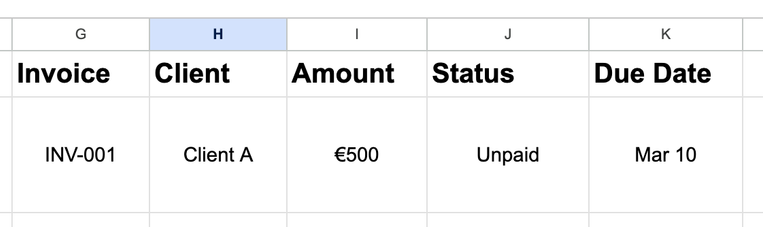
Then update manually:
- change to Paid when money arrives
- mark as Overdue if the due date passes
👉 Works, but requires discipline and constant updates
Option 2: Email + folders (basic)
- Move invoices into folders:
- Paid
- Unpaid
- Overdue
👉 Better than nothing, but:
- easy to forget
- not scalable
Option 3: Invoice software (recommended)
Modern tools track status automatically:
- invoice sent → Unpaid
- payment received → Paid
- due date passed → Overdue
👉 You don’t update anything manually
💡 Example:
In tools like InVault, you can instantly see all invoices by status in one dashboard — no spreadsheets or folders needed.
4. Keep Client Data Consistent
Use the same:
- client name
- billing details
Inconsistent data = confusion later.
Best Way to Keep Invoices (Manual vs Automated)
There are two main approaches:
Manual (Folders + Spreadsheets)
Pros:
- free
- flexible
Cons:
- time-consuming
- easy to make mistakes
- hard to scale
Automated (Invoice Software)
Pros:
- real-time tracking
- automatic categorization
- reminders and insights
Cons:
- some tools cost money
👉 The reality: If you send invoices regularly, automation saves hours every month.
List of Invoices Paid: How to Track Payments Clearly
One of the most common problems is not knowing what’s been paid.
Simple Paid Invoice List Should Include:
- Invoice number
- Client name
- Amount
- Payment date
- Payment method
Common Invoice Organization Mistakes
Most problems come from these:
❌ Using multiple systems
Emails + folders + spreadsheets = chaos
❌ No status tracking
You don’t know what’s unpaid
❌ No numbering system
Hard to find invoices
❌ Updating old invoices
Breaks accounting records
Why Simple Systems Work Better
Many businesses overcomplicate invoicing.
But the best systems are:
- simple
- consistent
- automated where possible
👉 That’s why lightweight tools are growing in popularity.
Instead of full accounting platforms, many users prefer tools that:
- focus only on invoicing
- are fast to use
- don’t require setup
InVault is an example of this approach:
- create invoices quickly
- keep everything organized automatically
- access from any device
- preserve historical invoice data
- view income trends without spreadsheets
It offers a free version with core features, with paid options if you need more.